read src/**allowed
write Cargo.tomlask
run cargo testsafe, auto
run git pushask once
Agent Hub · --agent-hook
Scoped approvals
Codex and Claude Code pause before writes, commands and network calls. You allow once, for the session, or deny.
Beta v0.8.8 · native Rust · Windows, macOS, Linux
Covalos is a native Rust IDE with a team of coding agents led by Luma, running on your own Claude Code, Codex and Gemini CLIs. Every write and command can stop for your OK, and Learn mode walks you through code one line at a time.
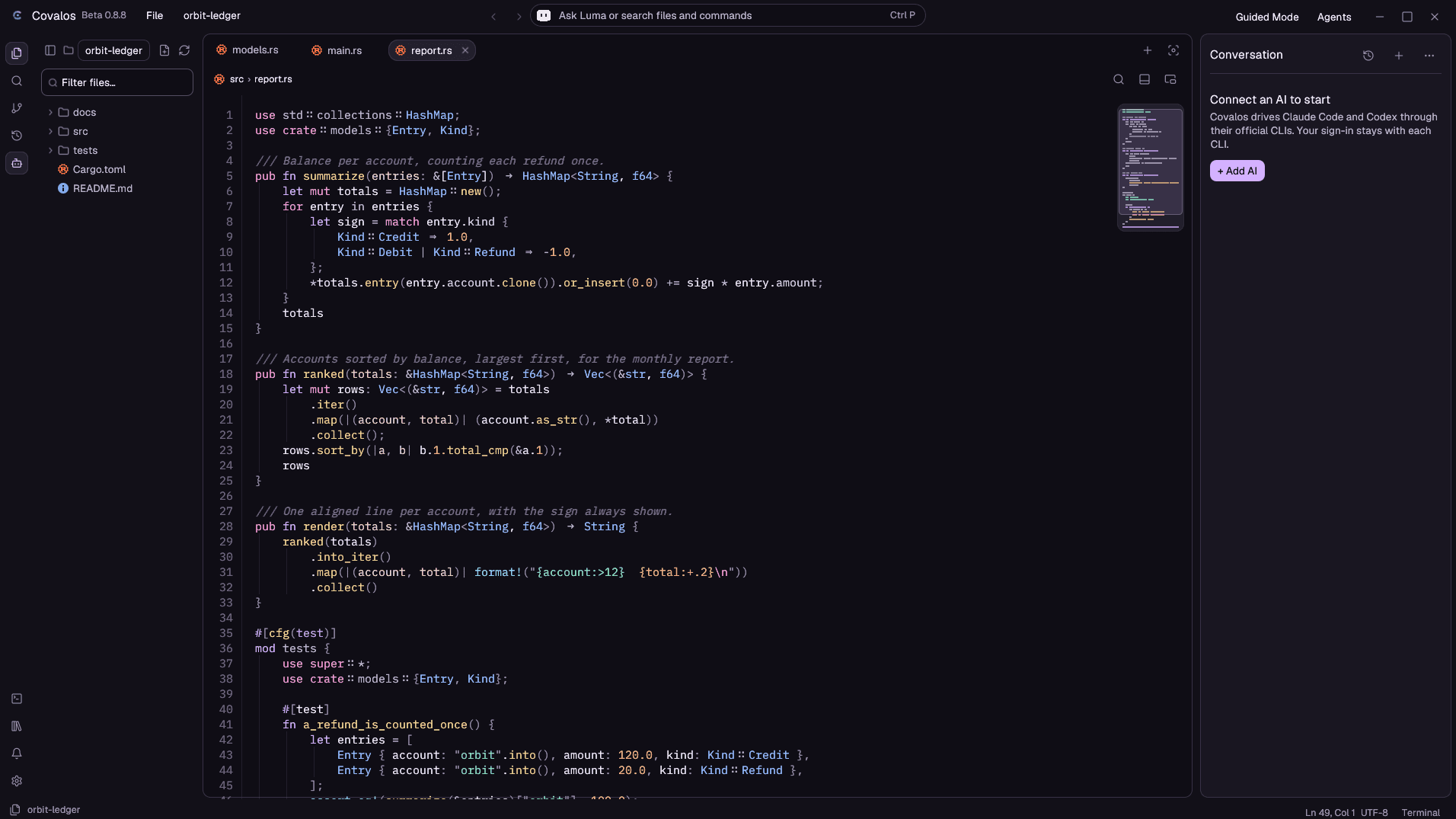
Nocturne theme, island panels, tabs and the minimap, with the agent panel beside the code.
Codex wants to run
cargo test --workspaceAgent Hub · --agent-hook
Codex and Claude Code pause before writes, commands and network calls. You allow once, for the session, or deny.
worktrees
unchanged worktrees are removed on close
Git
Each conversation works in its own git worktree. Review the diff, merge it, or let Covalos clean it up when nothing changed.
Natural just-in-time
Guided Mode
Steps float over your editor like lyrics and follow your buffer as you type. An import checker orders them so nothing breaks.
npm install @tanstack/react-table
Library Studio
2,050+ local entries across 10 registries. See the command, conflicts and license before anything is installed.
Under the hood
One binary.
No Electron.
Covalos ships as a single native binary, with no browser runtime inside. The interface is drawn on the GPU, the shaders stop when the window loses focus, and your tabs, workspace and conversations come back on restart.
| Search files, commands, settings | CtrlP |
|---|---|
| Toggle Explorer | CtrlB |
| Back / forward | Alt← / → |
| Library Studio | CtrlShiftL |
| Accept inline suggestion | Tab |
| Peek the minimap | Alt |
| Close overlay | Esc |
Theme, fonts, density, pinned chats, agent-rules.md and skills follow you between machines. Paths and API keys stay local.
While Covalos is open on your PC, the upcoming Android app can watch Luma and your agents, send prompts and answer approvals.
Verified themes, extensions and SKILL.md packs tied to your account. Not built yet.
Changelog
The last few builds, one line each. Open a release for the details.
All releases on GitHub ↗FAQ
VS Code and Cursor are built on Electron, so each window runs a browser engine. Covalos is a single Rust binary drawn on the GPU with egui, and its background effects stop when the window loses focus.
It also does not sell model access. Agents run through the official CLIs you already use, under your own accounts, and Luma coordinates them with approvals before writes and commands. It does not run VS Code extensions; it can import settings from VS Code, Cursor, Windsurf and Zed.
Claude Code, Codex and Gemini CLI, plus Antigravity and OpenCode. You install and sign in to each CLI yourself; Covalos starts it, shows its output and asks you before it writes files, runs commands or installs packages. Luma can give an order to one agent or split it across a team, never above the effort ceiling you set.
Yes. Describe what you want to build or paste a course link, and Guided Mode turns it into steps that you type yourself, in an order where every file you need already exists. Learn mode explains each line, can explain a block another way, and shows what each function calls when you hover it. Code only drops the explanations once you don't need them. Lessons are generated by one of the agent CLIs, so you need at least one signed in.
Your files and API keys stay local. Agents send what they need to their own provider through their own CLI, the same as running that CLI in a terminal. On Windows, keys are stored in Credential Manager; on macOS and Linux they are kept in memory for now.
A Covalos account is optional. If you sign in, only look-and-feel settings, pinned chats, agent rules and skills sync; paths, notes, provider accounts and keys never do.
Windows 10 and 11 (x64) is the main platform. macOS 11 or later (Apple silicon and Intel) and Linux x86_64 (AppImage or .deb) have builds since 0.8.8 and are less tested; the embedded web preview and the ports manager are Windows-only for now. Builds are not code-signed yet, so the first launch asks for confirmation.
The source is on GitHub. Read CONTRIBUTING.md for the build steps on each system, the checks to run and the commit conventions. Report bugs with your Covalos version and OS, and open an issue before starting a large feature.
Build from source with Cargo, install it on Windows, macOS or Linux, or get an email when the next release ships.
$git clone https://github.com/DevModee/Covalos.gitInstallers